Setting Your Opt Out Preference
Set the Opt Out preference and list on the Send SMS page
»
Updated over a week ago
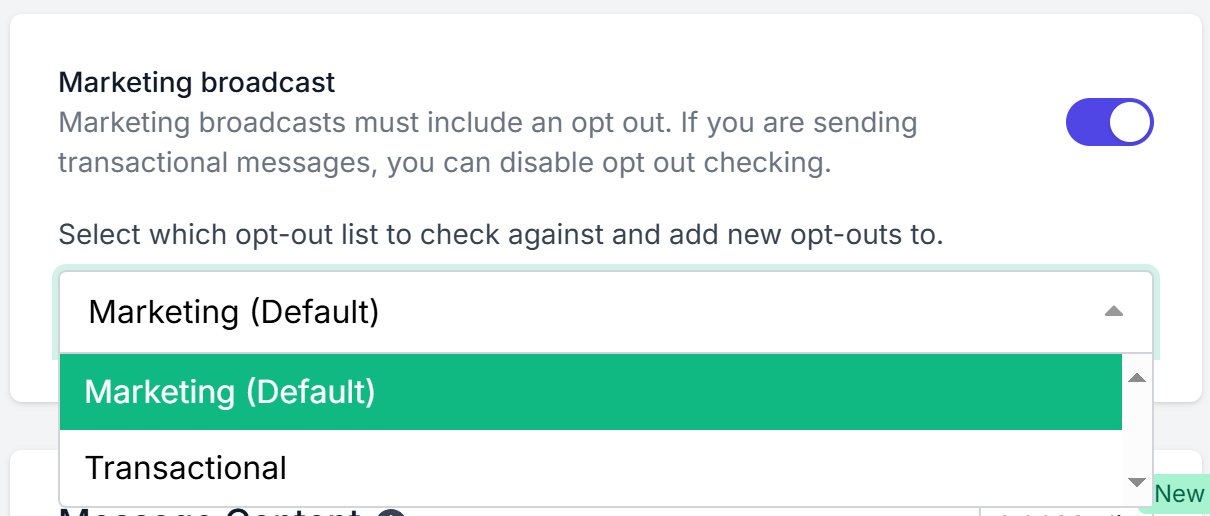
When creating a campaign in the Send SMS page, you’ll now see a new Marketing broadcast section.
This feature allows you to easily comply with anti-spam regulations while providing more control over how your recipients opt out of communications.
1. Identify if Your Message is Marketing or Transactional
Toggle the Marketing broadcast switch ON if the message is marketing or promotional in nature (e.g. sales, offers, promotions).
Marketing messages must include an opt out method.
Toggle the switch OFF for transactional or informational messages (e.g. appointment reminders, service alerts) where opt outs are not required.
2. Select the Opt Out List for the Campaign
If Marketing broadcast is ON, you can select which Opt Out List this campaign will check against and add new opt outs to.
For example:
Select Marketing (Default) to check against your primary marketing opt out list.
Select another list (e.g. Transactional) if you have set up different categories.
This ensures recipients can opt out from marketing messages while still receiving transactional or service-related SMS.
3. Campaign-Specific Opt Out Tracking
Any opt outs generated from this campaign will be directly attributed to the selected list.
Each list has its own unique opt out link (when using an Alpha Sender ID).
Opt out results for the selected list will appear in your campaign reports, making it easier to track engagement and compliance.
Why This Matters
Better compliance with Australia and New Zealand messaging regulations.
Segmentation of opt outs so transactional messages still reach recipients who opted out of marketing.
Improved reporting to see exactly which campaigns and lists are generating opt outs.